What does a quarterly business review actually need to do?
The idea behind a customer-facing QBR is simple. Your customer hired you, or bought your product, to help them achieve something. The QBR is the structured moment where you both sit down and ask: are we actually getting there?
It's not a status report. Nobody wants to sit through 45 minutes of someone reading metrics back at them. A good QBR is a progress conversation: here's where we're winning, here's where we're not, here's what we're doing about it. It's also the right moment to realign if your customer's goals have shifted, surface anything that needs to be reprioritized, and agree on what the next 90 days look like.
That conversation is also what keeps customers. Companies that run structured QBRs retain clients at rates 26% higher than those that rely on informal check-ins.
What should a QBR include? Where you are against what you said you'd do, what's changed, and what happens next. The template above covers the full structure.
The standard QBR format: what's in, what's optional
The QBR format doesn't need to be more complicated than that. Most customer-facing QBR templates follow a similar structure, regardless of industry or deal size. The depth changes depending on your audience — a $50K account gets a tighter deck than a $500K renewal — but the sections stay the same.
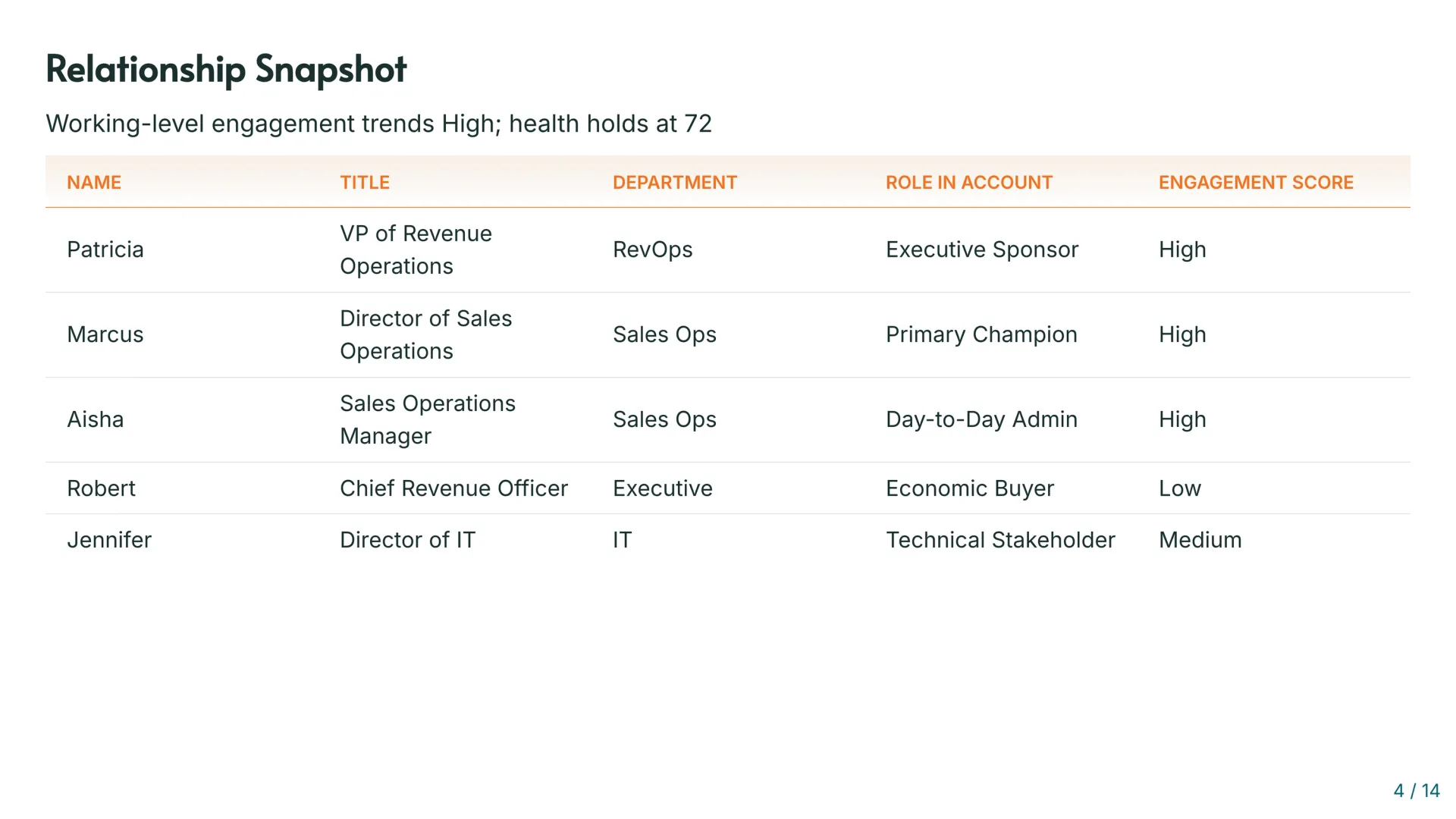
Stakeholder alignment. Before you get to numbers, you need to know who's actually engaged on the customer's side. Who's your champion? Who owns the budget? Who hasn't shown up to a single call this quarter? A disengaged economic buyer is a renewal risk regardless of how good everything else looks.
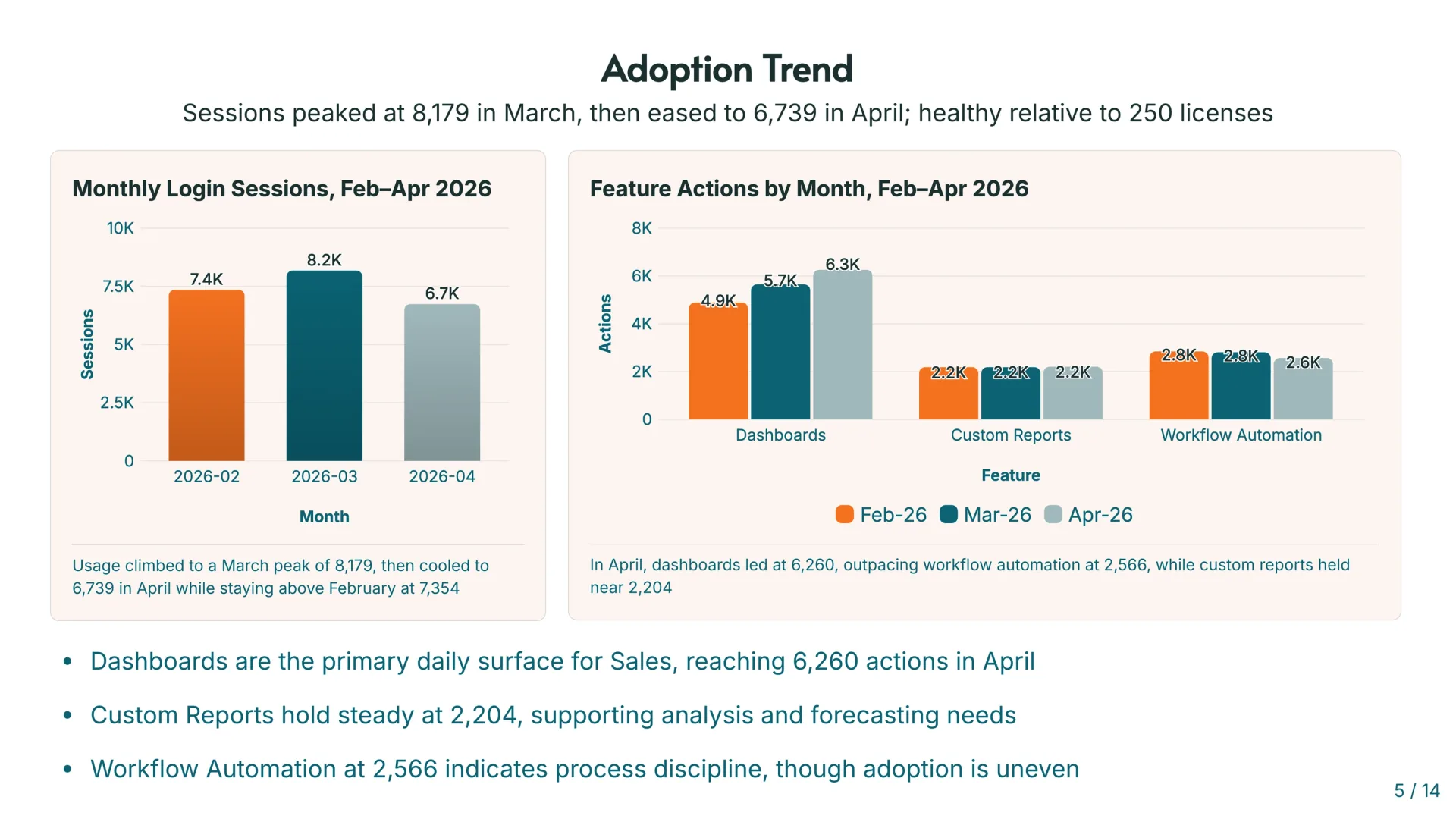
Adoption and usage. Are they using what they're paying for? This goes beyond login counts. Which features are driving value, which are sitting untouched, and where is there room to grow. Customers who don't adopt don't renew.
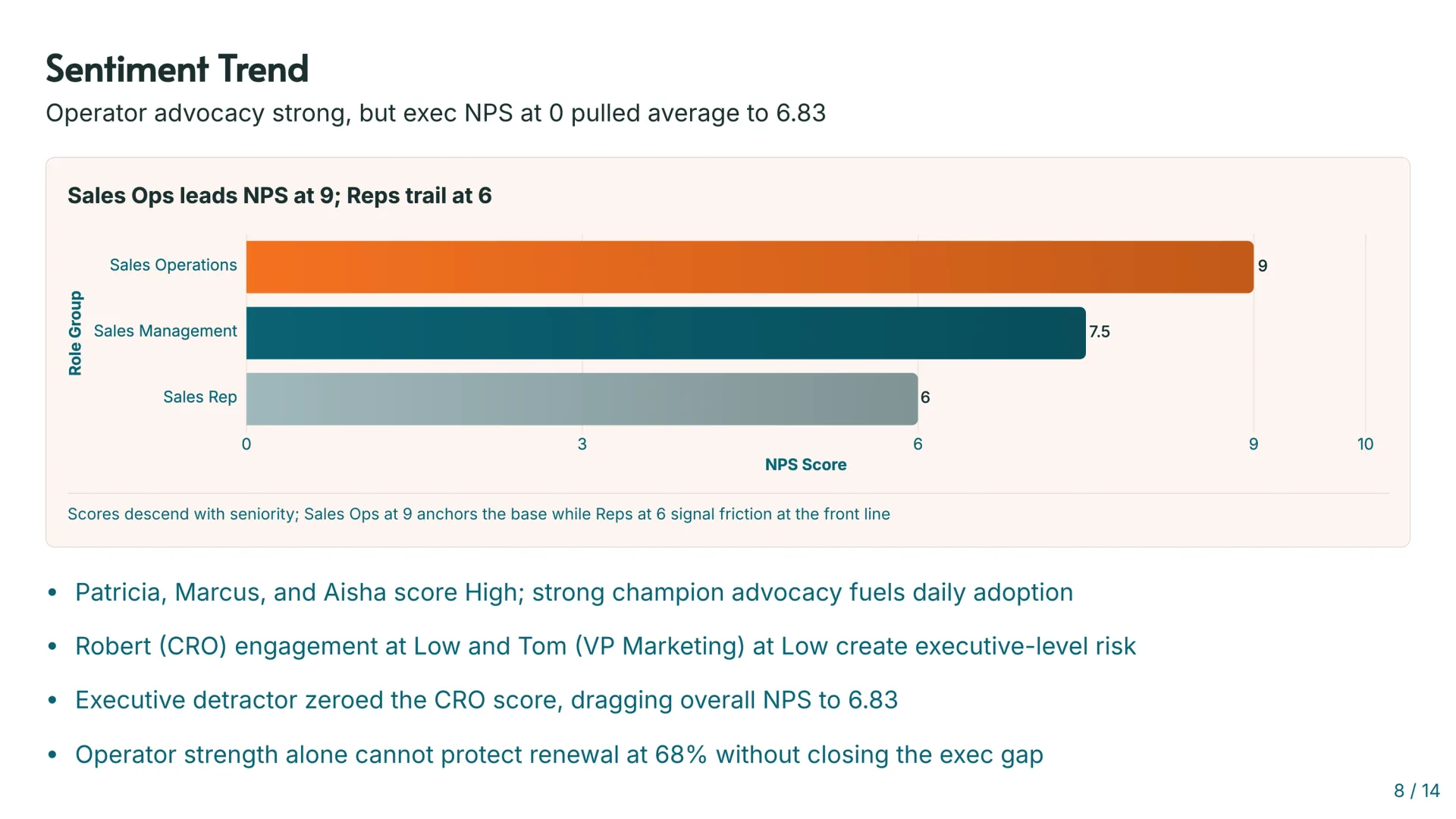
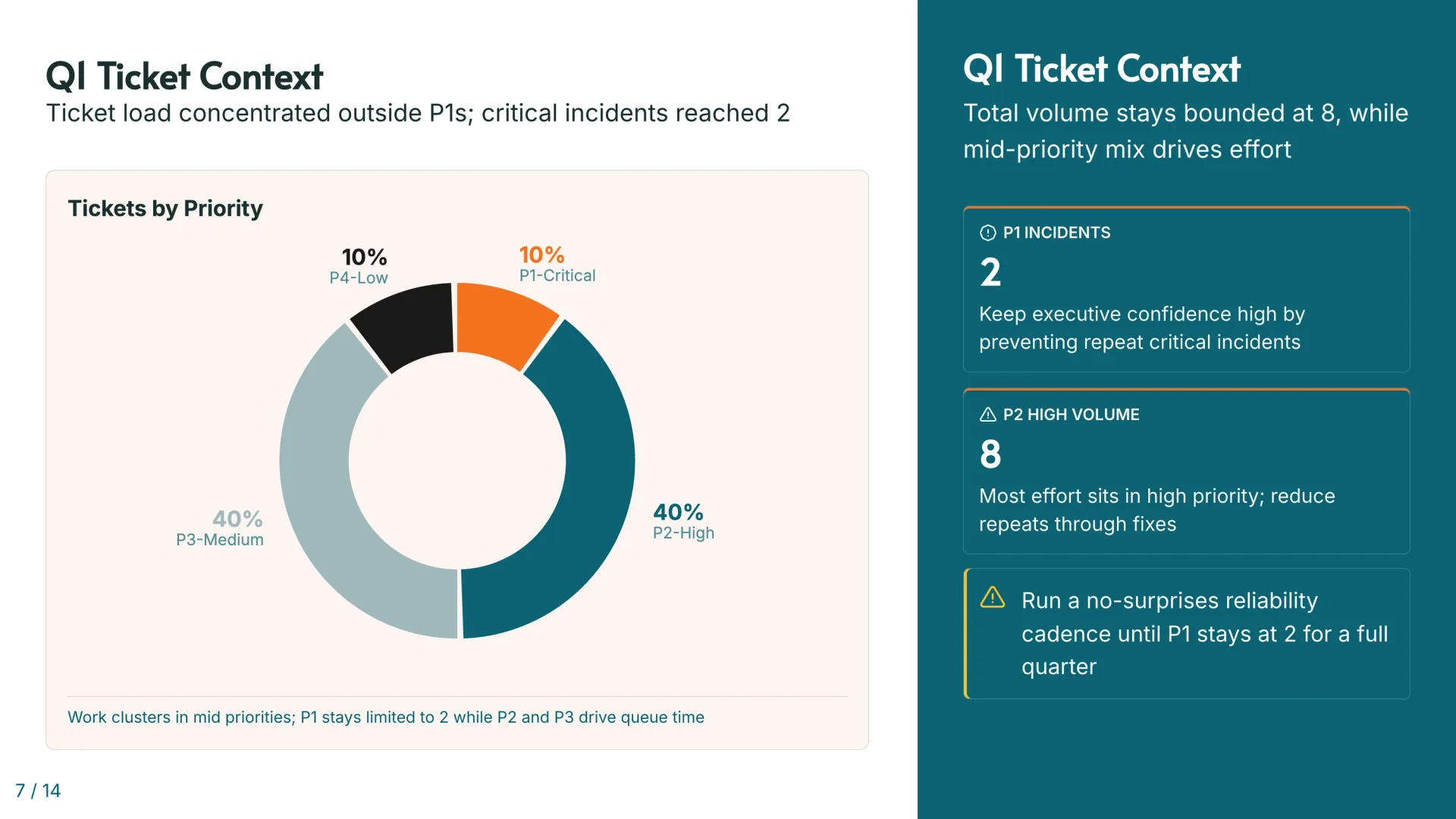
Support and sentiment. Ticket volume and resolution times tell one story. NPS and CSAT tell another. Put them together and you get a real picture of how the customer actually feels about working with you — not just what they say on calls.
Goals and value delivered. This is the accountability section. You agreed on outcomes last quarter. Here's where each one stands. And alongside it, the quantified value — hours saved, efficiency gained, anything that connects your product to their business results.
Risks and next steps. Where is the relationship vulnerable, and what are you doing about it. Not just risks — opportunities too. Accounts with healthy adoption often have room to expand if you surface it at the right moment.
That's the structure. The QBR format doesn't need to be more complicated than that. Five sections, a clear narrative, and every number tied to something the customer actually cares about.
QBR examples: what a good one looks like in practice
The difference between a QBR that moves things forward and one that just fills a calendar slot is usually visible in the first five minutes.
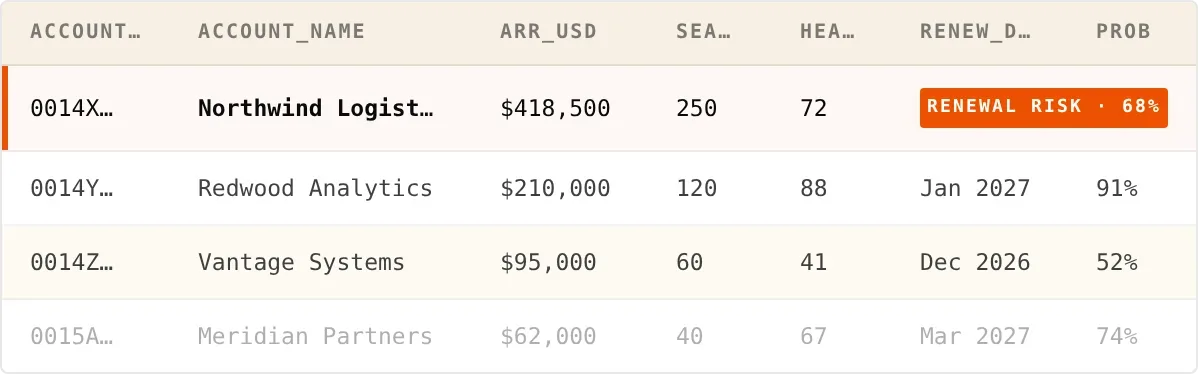
A CS team presenting to a mid-market SaaS customer opens with one slide: ARR, health score, renewal date, and a single executive takeaway. No preamble. The customer already knows roughly how the quarter went — this slide confirms it and sets the tone. From there, every section earns its time because the framing is already established.
Compare that to the QBR where slide eight is still on product roadmap updates and the economic buyer stopped paying attention on slide three. Same sections, same data. What's different is the order and the edit. The best QBR presentations are ruthlessly cut — if a slide doesn't change something the customer thinks or does, it doesn't belong in the deck.
The template above is built around that principle. Synthetic data, real structure. Upload your numbers and the narrative builds itself.
Why building a QBR template from scratch every quarter doesn't work
Most CS teams have a template. A Google Slides deck, a PowerPoint someone inherited from a previous hire, or a downloaded business review template that's never quite fit the way your team works. The structure is fine. The problem is the 15 hours it takes to fill it in.
Every slide needs current numbers. Those numbers live in your CRM, your support platform, your product analytics tool, and the spreadsheet your finance team sends on the last day of the month. Someone has to pull them, verify them, format them, and make sure nothing's stale by the time the meeting happens.
For a team running QBRs across 30 accounts, that's not a quarterly task. It's a full-time job.
Quarterly business review templates solve the structure problem. They don't solve the data problem. Coreworks solves both. Once your Q3 deck is built, your Q4 deck is one upload away — replace your data and Coreworks repopulates every number, every chart, every slide automatically. Same structure, current data, ready to present while ensuring the deck fits in the new narrative. No rebuilding. No copy-paste. Just the conversation.
QBR presentation template: slide by slide
If you're building your QBR deck template or your QBR slides manually, here's exactly what goes on each slide.
Slide 1 — The headline. Customer name, quarter, ARR, renewal date. One line of context: what's the state of this relationship going into this meeting?
Slide 2 — Executive summary. Four numbers: ARR, renewal probability or health score, open support tickets, and one executive takeaway that frames everything that follows. This is the slide decision-makers actually read.
Slide 3 — Stakeholder map. Who's highly engaged, who's medium, who's a blind spot. If the economic buyer is in the low-engagement bucket, that's the most important thing in the deck and everyone in the room should know it.
Slides 4–5 — Adoption and usage. Module-by-module breakdown. Where is usage strong, where is it lagging, and what does the gap between current adoption and potential adoption look like.
Slide 6 — Support and sentiment. Ticket mix, average resolution time, CSAT score, NPS. Don't just show the numbers — show the trend. A CSAT of 3.65 means something different if it was 4.2 last quarter.
Slides 7–8 — Goals and value. Last quarter's goals with current status: on track, in progress, blocked, behind. Then the value delivered — quantified wherever possible. Hours saved per user, lead response time reduction, efficiency metrics that connect to the customer's business outcomes.
Slide 9 — Risks and opportunities. The renewal risk signals and what you're doing about each one. Expansion opportunities where adoption or usage data suggests there's room to grow.
Slide 10 — Next steps. A phased action plan with owners and timelines. Not a list of things you hope happen — specific actions, specific people, specific weeks.
See how Coreworks builds this deck from real data. Explore the template